library(dplyr)
library(readr)
options(tibble.width = Inf)5 Joining Tables using dplyr
5.1 Introduction
In this chapter, we will learn to combine tables using different *_join functions provided in dplyr.
We will use the following R packages:
5.2 Case Study
For our case study, we will use two data sets. The first one, order, contains details of orders placed by different customers. The second data set, customer contains details of each customer. The below table displays the details stored in each data set.
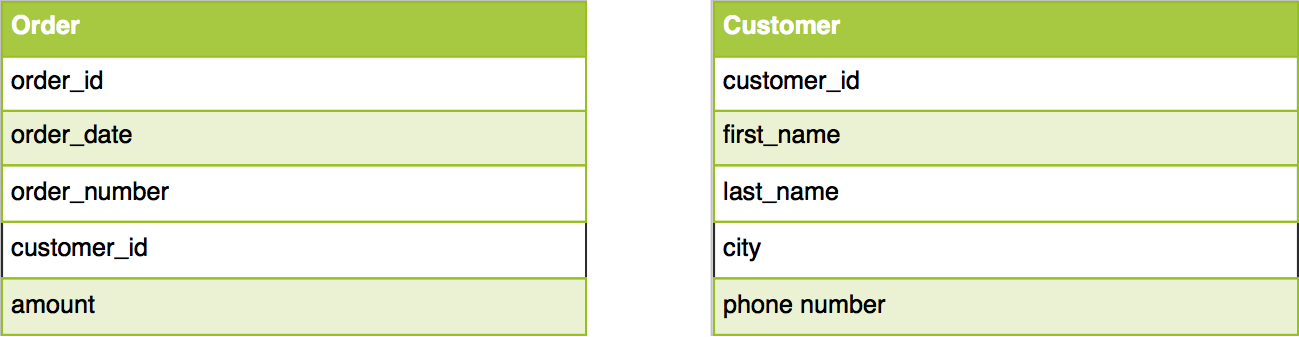
Let us import both the data sets using read_csv.
5.2.1 Data: Orders
order <- read_delim('https://raw.githubusercontent.com/rsquaredacademy/datasets/master/order.csv', delim = ';')
order
# A tibble: 300 × 3
id order_date amount
<dbl> <chr> <dbl>
1 368 7/2/2016 365.
2 286 11/2/2016 2064.
3 28 2/22/2017 432.
4 309 3/5/2017 480.
5 2 12/28/2016 235.
6 31 12/30/2016 2745.
7 179 12/21/2016 2358.
8 484 11/24/2016 1031.
9 115 9/9/2016 1218.
10 340 5/6/2017 1184.
# ℹ 290 more rows5.2.2 Data: Customers
customer <- read_delim('https://raw.githubusercontent.com/rsquaredacademy/datasets/master/customer.csv', delim = ';')
customer
# A tibble: 91 × 3
id first_name city
<dbl> <chr> <chr>
1 1 Elbertine California
2 2 Marcella Colorado
3 3 Daria Florida
4 4 Sherilyn Distric...
5 5 Ketty Texas
6 6 Jethro California
7 7 Jeremiah California
8 8 Constancia Texas
9 9 Muire Idaho
10 10 Abigail Texas
# ℹ 81 more rowsWe will explore the following in the case study:
- details of customers who have placed orders and their order details
- details of customers and their orders irrespective of whether a customer has placed orders or not
- customer details for each order
- details of customers who have placed orders
- details of customers who have not placed orders
- details of all customers and all orders
5.3 Example Data
We will use another data set to illustrate how the different joins work. You can view the example data sets below.
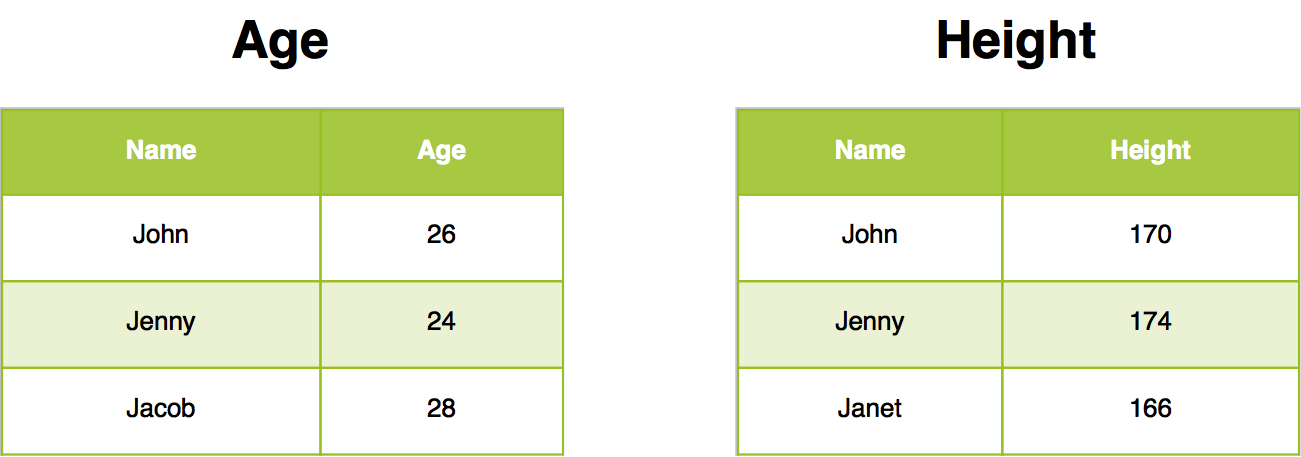
5.4 Specifying keys with join_by()
Every join below matches rows on the id column present in both tables, written as by = join_by(id). Use join_by() (dplyr >= 1.1) instead of a plain string whenever keys need attention:
- same name in both tables:
by = join_by(id) - different names:
by = join_by(customer_id == id) - multiple keys:
by = join_by(id, region)
TipAudit habit
Before trusting any join, run anti_join() in both directions (see Anti Join). Rows on either side with no match are data-quality findings, not join errors — investigate them first.
5.5 Inner Join
Inner join return all rows from Age where there are matching values in Height, and all columns from Age and Height. If there are multiple matches between Age and Height, all combination of the matches are returned.
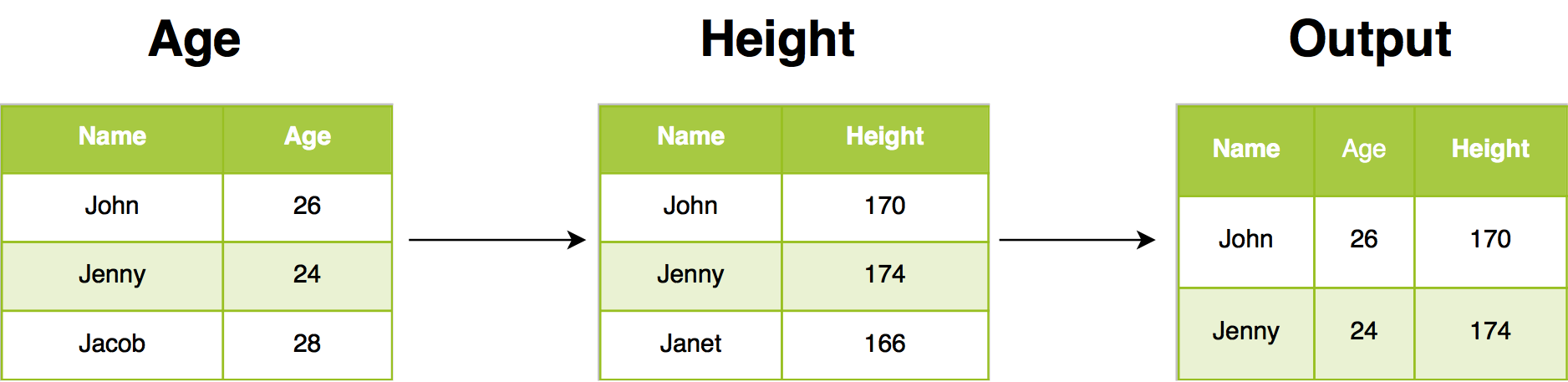
5.5.1 Case Study: Details of customers who have placed orders and their order details
To get data for all those customers who have placed orders in the past let us join the order data with the customer data using inner_join.
inner_join(customer, order, by = join_by(id))# A tibble: 55 × 5
id first_name city order_date amount
<dbl> <chr> <chr> <chr> <dbl>
1 2 Marcella Colorado 12/28/2016 235.
2 2 Marcella Colorado 8/31/2016 1150.
3 5 Ketty Texas 1/17/2017 346.
4 6 Jethro California 1/27/2017 2317.
5 7 Jeremiah California 6/21/2016 136.
6 7 Jeremiah California 2/13/2017 1407.
7 7 Jeremiah California 7/8/2016 1914.
8 8 Constancia Texas 11/5/2016 2461.
9 8 Constancia Texas 5/19/2017 2714.
10 9 Muire Idaho 12/28/2016 187.
# ℹ 45 more rows5.6 Left Join
Left join return all rows from Age, and all columns from Age and Height. Rows in Age with no match in Height will have NA values in the new columns. If there are multiple matches between Age and Height, all combinations of the matches are returned.
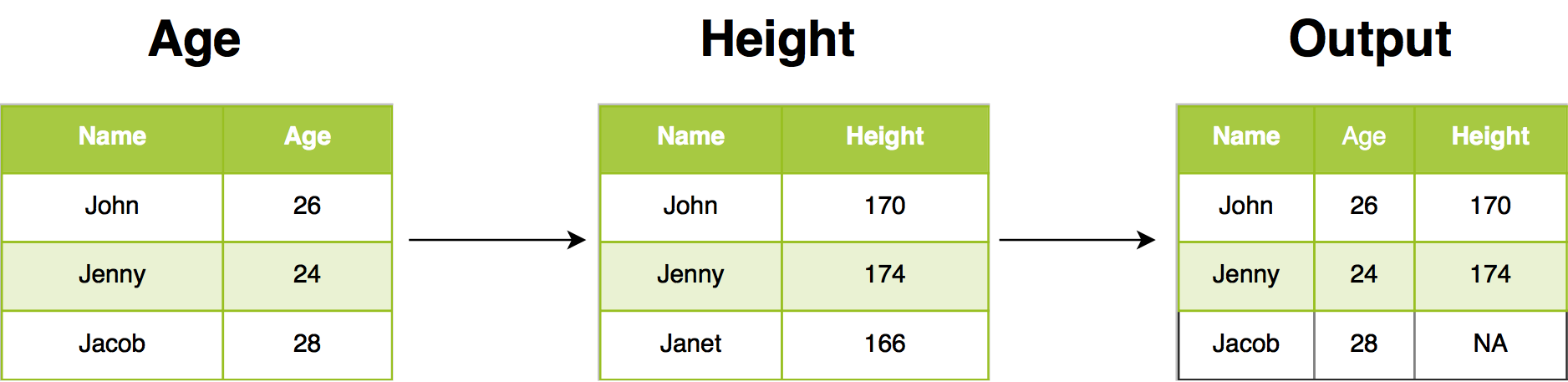
5.7 Case Study: Details of customers and their orders irrespective of whether a customer has
placed orders or not.
To get data for all those customers and their orders irrespective of whether a customer has placed orders or not let us join the order data with the customer data using left_join.
left_join(customer, order, by = join_by(id))# A tibble: 104 × 5
id first_name city order_date amount
<dbl> <chr> <chr> <chr> <dbl>
1 1 Elbertine California <NA> NA
2 2 Marcella Colorado 12/28/2016 235.
3 2 Marcella Colorado 8/31/2016 1150.
4 3 Daria Florida <NA> NA
5 4 Sherilyn Distric... <NA> NA
6 5 Ketty Texas 1/17/2017 346.
7 6 Jethro California 1/27/2017 2317.
8 7 Jeremiah California 6/21/2016 136.
9 7 Jeremiah California 2/13/2017 1407.
10 7 Jeremiah California 7/8/2016 1914.
# ℹ 94 more rows5.8 Right Join
Right join return all rows from Height, and all columns from Age and Height. Rows in Height with no match in Age will have NA values in the new columns. If there are multiple matches between Age and Height, all combinations of the matches are returned.
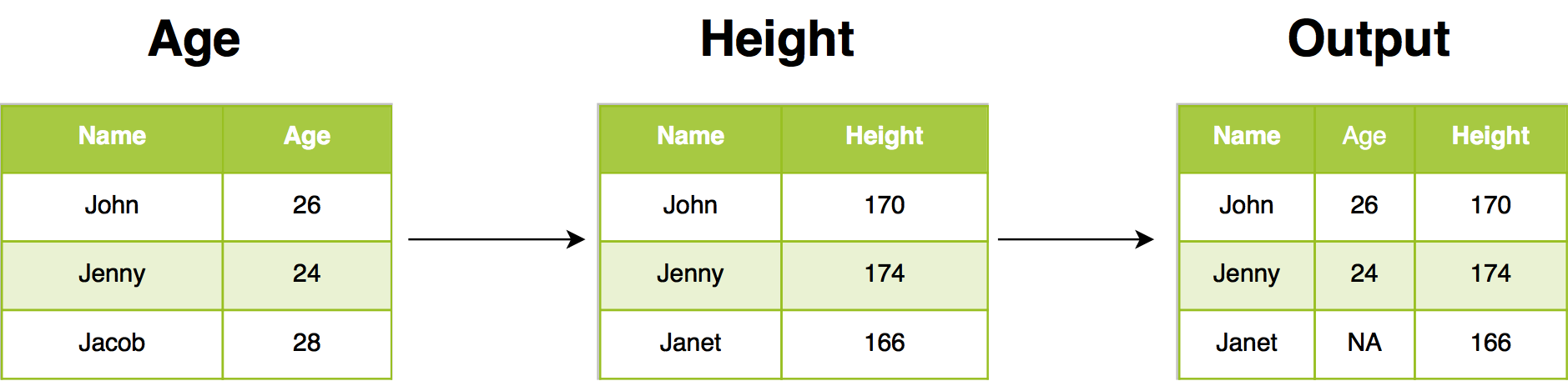
5.8.1 Case Study: Customer details for each order
To get customer data for all orders, let us join the order data with the customer data using right_join.
right_join(customer, order, by = join_by(id))# A tibble: 300 × 5
id first_name city order_date amount
<dbl> <chr> <chr> <chr> <dbl>
1 2 Marcella Colorado 12/28/2016 235.
2 2 Marcella Colorado 8/31/2016 1150.
3 5 Ketty Texas 1/17/2017 346.
4 6 Jethro California 1/27/2017 2317.
5 7 Jeremiah California 6/21/2016 136.
6 7 Jeremiah California 2/13/2017 1407.
7 7 Jeremiah California 7/8/2016 1914.
8 8 Constancia Texas 11/5/2016 2461.
9 8 Constancia Texas 5/19/2017 2714.
10 9 Muire Idaho 12/28/2016 187.
# ℹ 290 more rows5.9 Semi Join
Semi join return all rows from Age where there are matching values in Height, keeping just columns from Age. A semi join differs from an inner join because an inner join will return one row of Age for each matching row of Height, where a semi join will never duplicate rows of Age.
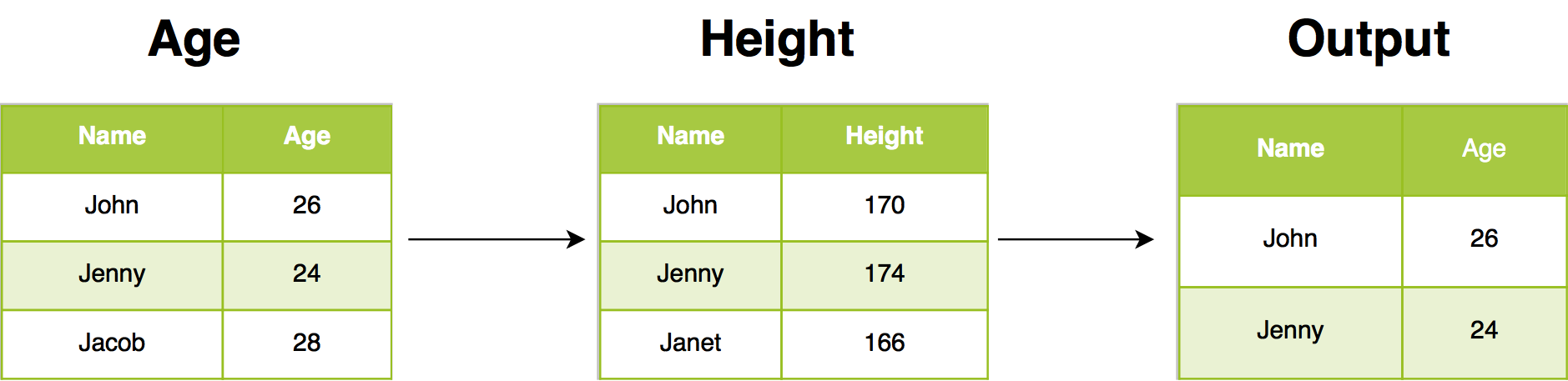
5.9.1 Case Study: Details of customers who have placed orders
To get customer data for all orders where customer data exists, let us join the order data with the customer data using semi_join. You can observe that data is returned only for those cases where customer data is present.
semi_join(customer, order, by = join_by(id))# A tibble: 42 × 3
id first_name city
<dbl> <chr> <chr>
1 2 Marcella Colorado
2 5 Ketty Texas
3 6 Jethro California
4 7 Jeremiah California
5 8 Constancia Texas
6 9 Muire Idaho
7 15 Valentijn California
8 16 Monique Missouri
9 20 Colette Texas
10 28 Avrit Texas
# ℹ 32 more rows5.10 Anti Join
Anti join return all rows from Age where there are not matching values in Height, keeping just columns from Age.
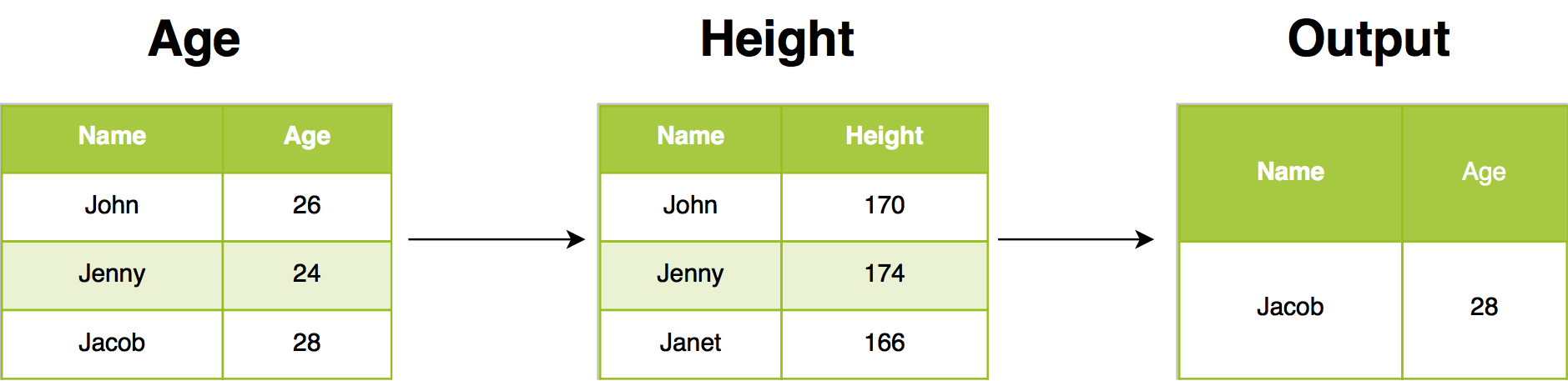
5.10.1 Case Study: Details of customers who have not placed orders
To get details of customers who have not placed orders, let us join the order data with the customer data using anti_join.
anti_join(customer, order, by = join_by(id))# A tibble: 49 × 3
id first_name city
<dbl> <chr> <chr>
1 1 Elbertine California
2 3 Daria Florida
3 4 Sherilyn Distric...
4 10 Abigail Texas
5 11 Wynne Georgia
6 12 Pietra Minnesota
7 13 Bram Iowa
8 14 Rees New York
9 17 Orazio Louisiana
10 18 Mason Texas
# ℹ 39 more rows5.10.2 Audit pattern: check mismatches in both directions
A single anti_join() shows only one side. Before trusting a join, check both:
# customers with no orders
anti_join(customer, order, by = join_by(id))
# A tibble: 49 × 3
id first_name city
<dbl> <chr> <chr>
1 1 Elbertine California
2 3 Daria Florida
3 4 Sherilyn Distric...
4 10 Abigail Texas
5 11 Wynne Georgia
6 12 Pietra Minnesota
7 13 Bram Iowa
8 14 Rees New York
9 17 Orazio Louisiana
10 18 Mason Texas
# ℹ 39 more rows# orders with no matching customer record
anti_join(order, customer, by = join_by(id))# A tibble: 245 × 3
id order_date amount
<dbl> <chr> <dbl>
1 368 7/2/2016 365.
2 286 11/2/2016 2064.
3 309 3/5/2017 480.
4 179 12/21/2016 2358.
5 484 11/24/2016 1031.
6 115 9/9/2016 1218.
7 340 5/6/2017 1184.
8 493 7/11/2016 1558.
9 340 2/15/2017 2330.
10 235 2/27/2017 149.
# ℹ 235 more rowsIn this data, 49 customers placed no orders — and 245 orders have no matching customer record. Those 245 rows are a data-quality finding (missing or mismatched customer data upstream), not a join mistake: an inner_join() will silently drop them, and a left_join()/right_join() will carry them with NAs. Decide deliberately which behavior the analysis needs.
5.11 semi_join vs anti_join: which filter join to use?
semi_join() and anti_join() are filter joins: they filter rows of x by match status in y and never add columns from y.
| Question | Filter join |
|---|---|
| Which customers placed orders? (keep matches) | semi_join(customer, order, by = join_by(id)) |
| Which customers placed no orders? (keep misses) | anti_join(customer, order, by = join_by(id)) |
| Which orders have no customer record? (audit the other side) | anti_join(order, customer, by = join_by(id)) |
5.11.1 When to use semi_join instead of inner_join
Use semi_join() when you want the customers (or orders) themselves, not the combined rows. An inner_join() duplicates the left row once per match — here 42 customers with orders explode to 55 joined rows — while semi_join() returns each matching customer exactly once (42 rows, customer columns only):
# one row per customer with orders — no duplication, no order columns
semi_join(customer, order, by = join_by(id))
# A tibble: 42 × 3
id first_name city
<dbl> <chr> <chr>
1 2 Marcella Colorado
2 5 Ketty Texas
3 6 Jethro California
4 7 Jeremiah California
5 8 Constancia Texas
6 9 Muire Idaho
7 15 Valentijn California
8 16 Monique Missouri
9 20 Colette Texas
10 28 Avrit Texas
# ℹ 32 more rows# one row per order — customers repeat, order columns attached
inner_join(customer, order, by = join_by(id))# A tibble: 55 × 5
id first_name city order_date amount
<dbl> <chr> <chr> <chr> <dbl>
1 2 Marcella Colorado 12/28/2016 235.
2 2 Marcella Colorado 8/31/2016 1150.
3 5 Ketty Texas 1/17/2017 346.
4 6 Jethro California 1/27/2017 2317.
5 7 Jeremiah California 6/21/2016 136.
6 7 Jeremiah California 2/13/2017 1407.
7 7 Jeremiah California 7/8/2016 1914.
8 8 Constancia Texas 11/5/2016 2461.
9 8 Constancia Texas 5/19/2017 2714.
10 9 Muire Idaho 12/28/2016 187.
# ℹ 45 more rowsRule of thumb: filtering rows → semi_join() / anti_join(); combining columns → inner_join() / left_join() / full_join(); diagnosing coverage → anti_join() in both directions.
5.12 Full Join
Full join return all rows and all columns from both Age and Height. Where there are not matching values, returns NA for the one missing.
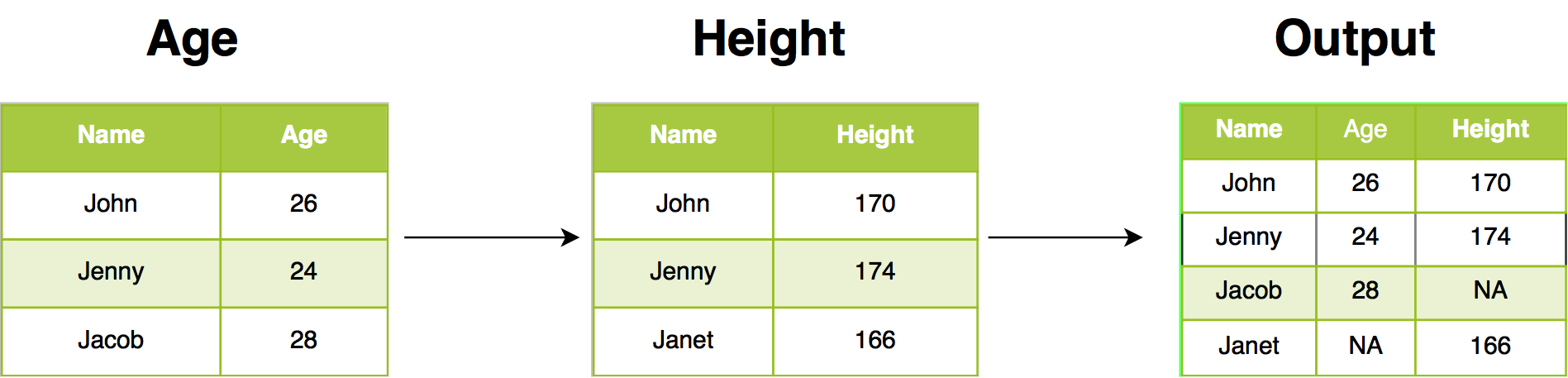
5.12.1 Case Study: Details of all customers and all orders
To get details of all customers and all orders, let us join the order data with the customer data using full_join.
full_join(customer, order, by = join_by(id))# A tibble: 349 × 5
id first_name city order_date amount
<dbl> <chr> <chr> <chr> <dbl>
1 1 Elbertine California <NA> NA
2 2 Marcella Colorado 12/28/2016 235.
3 2 Marcella Colorado 8/31/2016 1150.
4 3 Daria Florida <NA> NA
5 4 Sherilyn Distric... <NA> NA
6 5 Ketty Texas 1/17/2017 346.
7 6 Jethro California 1/27/2017 2317.
8 7 Jeremiah California 6/21/2016 136.
9 7 Jeremiah California 2/13/2017 1407.
10 7 Jeremiah California 7/8/2016 1914.
# ℹ 339 more rows5.13 Cross Join
cross_join() returns every combination of rows from both tables (a Cartesian product), so it takes no key. Use it for grids — e.g. all size × color combinations — never for large tables, since the result has nrow(x) * nrow(y) rows.
cross_join(tibble(size = c("S", "M")), tibble(color = c("red", "blue")))# A tibble: 4 × 2
size color
<chr> <chr>
1 S red
2 S blue
3 M red
4 M blue Try it live
TipTry it in your browser
Edit the code below and press Run. It executes entirely in your browser via WebR — no R installation needed. The runtime downloads once, on this page only.